
APPS
This Good Lock module gets One UI 7 support


Samsung’s progress on One UI 7 is going well, and the company is also spending a good amount of time making its Good Lock module and apps compatible with One UI 7. Today, Samsung is adding One UI 7 support to the MultiStar module of Good Lock, which enhanced the Multiwindow experience.
Samsung MultiStar app gets One UI 7 support
Samsung MultiStar app is getting a new update with version 9.0.15 with the One UI 7 support. This update includes some new features and improvements that will make customizing your Samsung device even more useful for multitasking capabilities.
The update for the Samsung MultiStar app also extends ‘Split Mode Maintain’ to all models. This feature lets users keep their screen view active even after closing and reopening apps to enhance productivity on the big screen.
Moreover, it also includes some general bug fixes and stability improvements. You can download this app from the Galaxy Store or from the Good Lock app. Moreover, you can also download the update from the third-party app links mentioned below.
- Samsung MultiStar 9.0.15: Download link
Early today, support for the upcoming One UI version arrived in the Good Lock Theme Park module. As we get closer to One UI 7, we can expect similar updates for other Good Lock modules and Samsung apps in the coming days.
One UI 7 will debut on the upcoming Galaxy S series, the Galaxy S25 series. The new flagship phones are expected to be officially unveiled at the Galaxy Unpacked event on January 22 and go on sale on February 7, 2025. Most existing Galaxy S series smartphones will get One UI 7, along with select tablets and Galaxy A series smartphones in February.
Like One UI 6.1 and One UI 6.1.1, version 7.0 will bring some new AI-based features that will join the existing Galaxy AI suite. There will also be several non-AI changes and improvements, you can check out the beta changelog here.
More on One UI 7






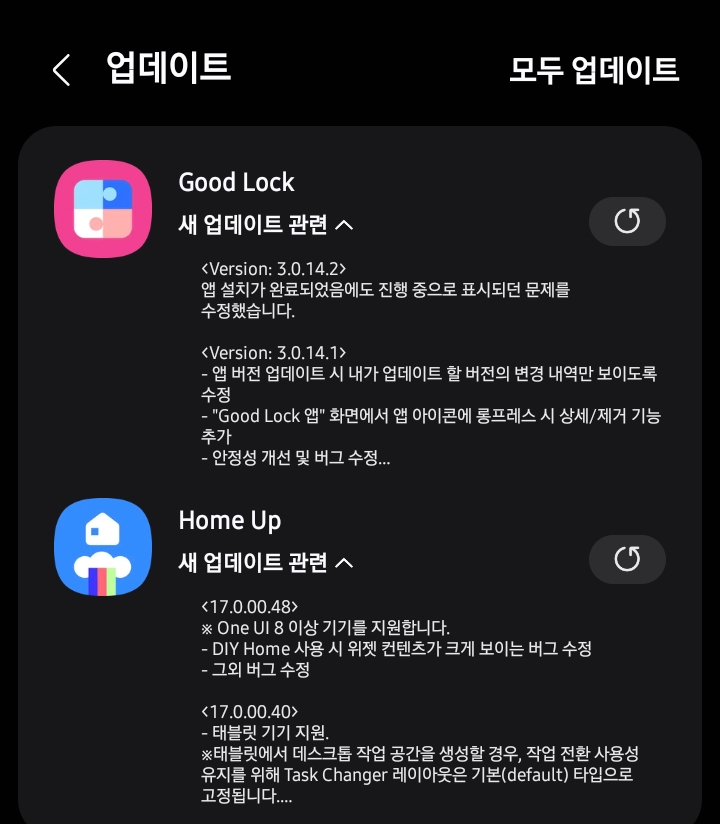
Samsung has rolled out a new update for its popular customization tool, Good Lock and Home Up app, bringing the app to version v3.0.14.2 and v17.0.00.48, respectively. This latest update improves the overall user experience with several improvements that boost stability.
The new update primarily focuses on stability to make the app more reliable for users. Samsung has also fixed an issue with the Good Lock app where the app installation appeared to be in progress even after it was complete.
Home Up is one of Samsung’s Good Lock suite, with the new update, fixing a bug that caused widget content to appear larger when using DIY Home. The Korean tech giant has also addressed various bugs and glitches reported by users in previous versions to ensure a smoother and more reliable performance.
Further, this update also includes improved app stability to reduce crashes and enhance overall responsiveness. While there aren’t any major new features in this update, these small changes help improve the overall experience for users who like to customize their phones.
To install the latest version of Good Lock and Home Up apps, users can head to the Galaxy Store, tap on the Menu button, and select Updates. Furthermore, the update is available directly through the Good Lock app. Install the update now to enjoy enhanced features.

Samsung is rolling out a new update for the One UI Good Lock app, which is full of interesting features for flagship devices. Alongside useful add-ons, the Korean tech giant is improving the overall performance and stability aspects of the app.
Good Lock is an app that helps you customize your Galaxy phone by giving you control over features like the home screen, quick settings, and other system settings. According to the changelog, Samsung has improved the visibility of updated apps under Good Lock, which means you don’t have to figure out which ones are new or updated; everything is clear.
Samsung Good Lock app is getting a new update on Galaxy devices with version 3.0.12.2. This update brings improvements to make the app work better and more smoothly.
The Korean phone maker keeps on updating its apps and services to offer a reliable app experience. It also fixes app freezing, crashing, and lagging issues and seeds them with the latest enhancements. The Good Lock app is no exception in this case.
According to the details, Samsung has shared improvements and features for the One UI Good Lock app and has begun rolling out this update to the flagship handsets.
Users of the Samsung devices can install the latest update of the Good Lock app through Galaxy Store >>Menu option >> Updates. If you have received the Samsung Good Lock 3.0.12.2 update, download it now to enjoy enhanced features.

Several Samsung Galaxy devices are already compatible with the One UI 7 Home Up support, while Galaxy Fold and Tablet devices are still undergoing testing for full support. Samsung has recently rolled out a new update for its Home Up Good Lock module with version 16.0.00.82 on One UI 7 devices.
This Samsung’s new One UI 7 Home Up update includes a significant improvement, including Fold and Tablet support in addition to new DIY home features.
According to the changelog, the new update expands One UI 7 Home Up support to Galaxy Fold and tablet devices, which were previously not fully compatible with this Good Lock app. Apart from support, the update includes general bug fixes to improve the stability and performance of the app.
Home Up is a Samsung Good Lock module for home screen customization. It helps users manage their home screen more effectively. Also, you can customize your Galaxy phone’s home screen without even opening the Home Up app, as some of its settings will be available in the One UI Home app launcher.
Now, the new update makes the app more useful and stable on your Fold and Tab devices. You can easily update the app, just open the Galaxy Store, tap on the menu button, and go to the Updates section to find Home Up. You can also open the Good Lock app and update it from there.
If you use Home Up often, it’s important to install version 16.0.00.82 to enjoy a smoother and more reliable experience.
-

 NEWS2 years ago
About the Battery Health and performance of Galaxy S25
-
 NEWS2 years ago
Samsung Android 15 update: Which Galaxy devices will get One UI 7
-
 NEWS1 year ago
Join the One UI 8 Beta Program: Experience the latest One UI with Android 16
-
 NEWS2 years ago
More evidence suggests the Galaxy S25 Ultra may eventually adopt this Pixel security feature
-
 ANDROID1 year ago
Samsung Galaxy phones and tablets that should receive Android 16 and One UI 8 update
-

 NEWS2 years ago
Samsung Galaxy S25 Ultra battery and Charging test: Upgrade results
-
 NEWS2 years ago
Galaxy S25 to integrate Bixby and AI into camera app
-
 NEWS2 years ago
One UI 7 battery icon to show charge levels with dynamic colors